Let’s be honest. For years, the promise of “AI that writes code” felt like science fiction—a distant future of self-building software. Well, the future arrived quietly, not with a bang, but with an autocomplete suggestion. Today, AI-assisted programming tools are woven into the daily grind of developers everywhere, from seasoned architects to bootcamp grads. They’re not replacing developers; they’re reshaping the very rhythm of how we think, type, and problem-solve.
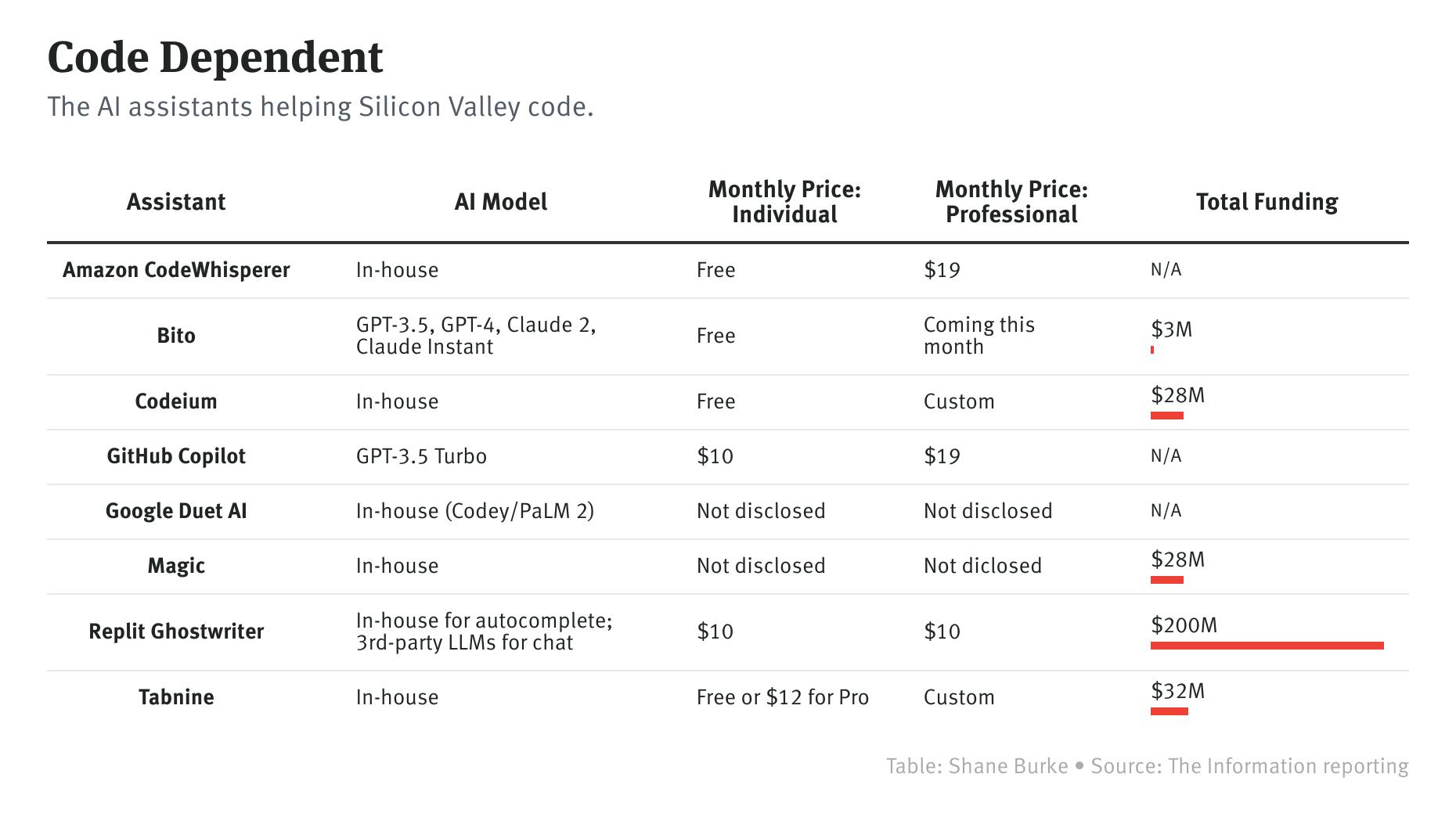
Here’s the deal: these tools, like GitHub Copilot, Amazon CodeWhisperer, and Tabnine, act as a supercharged pair programmer. They sit in your IDE, whispering suggestions, finishing lines, and sometimes drafting whole functions based on a simple comment. It’s less about automation and more about… amplification.
From Grunt Work to Flow State: The Daily Impact
So, what does this look like in practice? Imagine the tedious parts of coding—boilerplate setup, writing unit test templates, parsing a tricky API response. The repetitive, syntax-heavy tasks that drain mental energy. AI coding assistants excel here. They handle the predictable scaffolding, freeing you to focus on the complex logic, the architecture, the “why” behind the code.
This shift is profound. Developers report entering a state of “flow” more easily. The friction of switching contexts—from documentation back to editor, from brainstorming to implementation—diminishes. The tool keeps pace with your intent, reducing those frustrating micro-pauses that break concentration. It’s like having the documentation, Stack Overflow, and a syntax expert all sitting right there, tuned to your specific project.
Common Workflow Integrations (Where the Magic Happens)
You know, it’s not one big feature. It’s a hundred small conveniences. Here’s where AI-assisted development tools are making a tangible dent:
- Code Completion & Generation: Goes far beyond standard IntelliSense. You type a comment like
// function to validate email and hash password, and it suggests the entire block. It’s context-aware, pulling from your open files. - Debugging & Explaining Code: Stuck on an inherited, cryptic function? You can highlight it and ask, “What does this do?” The AI provides a plain-English explanation, often spotting potential edge cases or bugs.
- Test Generation: A major time-sink. These tools can automatically generate unit test skeletons for your functions, covering basic happy paths and encouraging better test coverage from the start.
- Documentation & Comments: It works both ways. It can write docstrings from your code, or generate code from your docstrings. Keeping documentation in sync becomes less of a chore.
Not Just a Tool, a Workflow Redesign
Adopting an AI pair programmer isn’t just about installing a plugin. It subtly changes your process. You start to “think in prompts.” Writing a clear comment becomes a design step. The feedback loop between idea and executable code tightens dramatically.
That said, it introduces new skill sets. The ability to guide the AI, to craft effective prompts, and—crucially—to rigorously review its output becomes paramount. The AI is a powerful intern, not an oracle. It can be confidently wrong, suggesting plausible but outdated or insecure code patterns. The developer’s role evolves from pure writer to savvy editor and curator.
| Traditional Workflow | AI-Assisted Workflow |
| Manual boilerplate coding | AI-generated scaffolding, manually refined |
| Context switching to docs/forums | Inline explanations and suggestions |
| Debugging via print statements/stepping | AI-assisted root cause analysis |
| Writing tests after development | Tests generated concurrently with code |
The Inevitable Concerns: Code Quality and “Skill Atrophy”
Honestly, the worries are valid. Will over-reliance on AI-assisted programming tools make junior developers… well, not develop? It’s a fair point. There’s a risk of not understanding the underlying mechanics of the code you’re shipping. And then there’s the question of code provenance. The AI is trained on public code, which may include bugs, security flaws, or licensing issues.
The counter-argument, and I think the stronger one, is that these tools actually accelerate learning. They expose developers to more patterns, more languages, more solutions instantly. The key is mindful use—not accepting every suggestion blindly. Treat the output as a first draft, a conversation starter. The cognitive load shifts from memorizing syntax to evaluating architecture and logic.
Looking Ahead: The Evolving Developer Experience
This is just the beginning, really. We’re seeing these tools move from code completion to entire AI-powered development environments. Imagine an AI that can:
- Onboard you to a massive legacy codebase by answering natural language questions about it.
- Refactor a module based on a high-level instruction (“make this function more resilient to network timeouts”).
- Proactively flag potential performance bottlenecks as you type.
The workflow becomes less about translating thought to text and more about collaborating with an intelligent system on the implementation itself. The line between developer and tool blurs—in a good way, like any great partnership.
Sure, there will be challenges. Licensing, security, and the environmental cost of training these large models are real conversations. But the trend is unmistakable. The developer’s value is ascending from the syntax layer to the intention layer. It’s less about *how* to write a loop and more about *what* that loop should achieve in the grand scheme of the application.
So, in the end, the story isn’t about AI writing code. It’s about AI giving developers back their most finite resource: attention. It filters the noise, handles the mundane, and lets human creativity focus on the parts that are, well, truly human. The puzzles, the elegance, the building of something meaningful. The tools are changing, but the craft—the need for a curious, critical, and creative mind—that’s only becoming more vital.