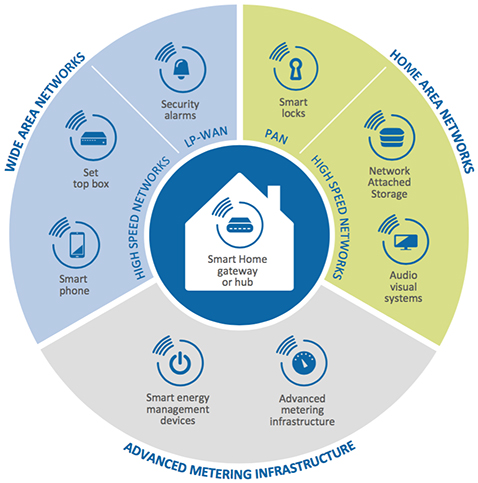
Your smart fridge is talking to your thermostat. Your doorbell is whispering to your lights. And your coffee maker? It’s probably gossiping with your phone. Sounds cozy, right? Well, not really. In fact, it’s a security nightmare waiting to happen. That’s where zero-trust architecture for home IoT device networks comes in — and honestly, it’s the only sane way to run a smart home these days.
Why your smart home is basically a digital frat house
Here’s the deal: most home networks treat every device like a trusted family member. Your laptop, your smart bulb, that weird Wi-Fi enabled toaster you bought on a whim — they all get the same VIP access. But think about it. That cheap IoT camera from an unknown brand? It’s probably phoning home to servers in three different countries. And your network just rolls out the red carpet.
Zero-trust flips that script. It assumes nothing is trustworthy — not even devices you own. Every request, every connection, every little data packet gets verified. It’s like having a bouncer who checks IDs even for your own grandmother. Sounds harsh? Sure. But it’s necessary.
The “trust no one” philosophy — applied to gadgets
Zero-trust architecture (ZTA) isn’t new. Big companies have used it for years. But bringing it home? That’s a relatively fresh idea — and a powerful one. The core principle is simple: never trust, always verify. That means micro-segmentation, least-privilege access, and constant monitoring. For your home, it translates into keeping your smart bulb from ever chatting with your bank app.
Let’s break that down a bit, because it can sound like tech gobbledygook. Micro-segmentation is just a fancy way of saying “put devices in separate little rooms.” Least-privilege means giving a device only the access it absolutely needs — your smart plug doesn’t need to see your photos, right? And constant monitoring? Well, that’s just keeping an eye on who’s knocking.
The real pain points — and why ZTA solves them
I’ve seen too many smart homes get pwned because of one vulnerable device. A friend of mine had his baby monitor hacked. Creepy stuff. The problem? That monitor shared the same network as his laptop, his work files, and his family photos. Once the monitor was compromised, the attacker had a free pass to everything else. Zero-trust would have stopped that cold.
Here are some common pain points zero-trust addresses:
- IoT device sprawl — You’ve got 20+ devices, each with its own firmware, vulnerabilities, and questionable privacy policies.
- Lack of updates — Many smart devices stop receiving security patches after a year. They become ticking time bombs.
- Overprivileged access — Your smart speaker doesn’t need to see your banking session. But on a flat network, it can.
- Insider threats — Even “trusted” devices can be hijacked. A compromised light bulb can become a spy.
Zero-trust doesn’t just patch these holes — it re-architects the whole playing field.
How to build a zero-trust home network (without losing your mind)
Alright, let’s get practical. You don’t need to be a network engineer to implement zero-trust for home IoT device networks. You just need a bit of planning and the right tools. Here’s a step-by-step approach that won’t make you want to throw your router out the window.
Step 1: Map your digital kingdom
First, list every single device that connects to your Wi-Fi. Yes, even that old printer you forgot about. You’ll be surprised. I did this recently and found a forgotten smart plug still broadcasting its presence. Creepy. Write them down — or use a network scanner app. Know what’s on your turf.
Step 2: Segment like a pro
This is the heart of zero-trust. Create separate VLANs (virtual local area networks) for different device types. Most modern routers support this. Here’s a simple layout:
| VLAN | Devices | Internet Access? | Can talk to other VLANs? |
|---|---|---|---|
| VLAN 1 (Trusted) | Laptops, phones, tablets | Yes | Limited |
| VLAN 2 (IoT) | Smart lights, plugs, cameras | Yes (restricted) | No |
| VLAN 3 (Guest) | Friend’s devices, weird gadgets | Yes | No |
| VLAN 4 (Isolated) | Old, unpatched devices | No | No |
See how that works? Your IoT gadgets can still reach the internet (for firmware updates and basic functionality) but they can’t poke around your laptop. It’s like putting your rowdy guests in a separate room with their own snacks.
Step 3: Enforce least-privilege access
Now, fine-tune what each VLAN can do. Your smart thermostat needs to talk to the weather service — fine. But does it need to access your NAS drive? Nope. Use firewall rules to block unnecessary traffic. Most router firmware (like OpenWrt or pfSense) lets you set these rules. It takes a bit of tinkering, but it’s worth it.
Honestly, this step is where most people give up. Don’t. Start small — just block IoT devices from talking to your main network. That alone eliminates 80% of the risk.
Tools of the trade — what you’ll actually need
You don’t need enterprise gear. Sure, a Ubiquiti Dream Machine or a Firewalla box is nice, but you can do a lot with a decent consumer router that supports VLANs. Some recommendations:
- TP-Link Omada — Good balance of price and features. Supports VLANs and has a nice controller interface.
- Asuswrt-Merlin — Custom firmware for Asus routers. Adds VLAN support and advanced firewall rules.
- OpenWrt — The gold standard for DIY. Works on many old routers. Steep learning curve, but incredibly powerful.
- Firewalla Purple — A plug-and-play solution with zero-trust features built-in. Expensive, but dead simple.
Also, consider using a separate SSID for your IoT devices. Most routers let you create a guest network — but that’s not enough. You need proper VLAN isolation, not just a separate Wi-Fi name. Guest networks often still allow local device discovery. That’s a loophole you don’t want.
The tricky part — smart home ecosystems that fight back
Here’s where things get sticky. Some smart home platforms (looking at you, Google Home and Alexa) rely on local network discovery. If you isolate your IoT devices too aggressively, your voice assistant might not find your smart lights. It’s a pain.
The workaround? Use a dedicated bridge or hub. For example, a Philips Hue bridge can sit in your IoT VLAN, while your phone (on the trusted VLAN) communicates with it via the cloud or a specific firewall rule. It’s not perfect, but it works. You might need to allow mDNS (multicast DNS) traffic between VLANs for some devices — just be selective about it.
Another option: use a separate “smart home” VLAN that includes both your hub and your IoT devices, and then allow the hub limited access to your trusted VLAN. That way, you only have one bridge to manage, not twenty individual devices.
Monitoring — because trust is a verb, not a noun
Zero-trust isn’t a set-it-and-forget-it thing. You need to monitor. Tools like Pi-hole (for DNS filtering) or a simple network analyzer like Wireshark can help. But honestly, even just checking your router’s logs once a week is better than nothing. Look for unusual outbound connections — like your smart fridge trying to reach a server in Russia. That’s a red flag.
I use a combination of Pi-hole and a Firewalla box. The Firewalla alerts me when a new device appears or when an existing device starts behaving oddly. It’s like having a security guard who never sleeps. And yeah, it costs a bit, but peace of mind is priceless.
The future of home IoT security — a quick look ahead
We’re seeing a shift. Matter protocol (the new smart home standard) promises better security by design, but it’s still early days. Zero-trust architecture for home IoT device networks is likely to become the norm, not the exception. As more people wake up to the risks, router manufacturers are starting to bake in these features. Even ISPs are offering managed security services.
But here’s the thing — you don’t have to wait. You can start today. Even a simple change like putting your IoT devices on a separate SSID with firewall rules is a huge step forward. It’s not perfect zero-trust, but it’s a hell of a lot better than a flat network.
Final thoughts — the moat you build today protects tomorrow
Your smart home is only as smart as its security. And honestly, the default setup most people have is… well, dumb. Zero-trust architecture isn’t about paranoia — it’s about pragmatism. It’s admitting that your $15 smart plug probably isn’t built with Fort Knox-level security. And that’s okay. You just need to build the moat around it.
So go ahead. Segment your network. Lock down your VLANs. And sleep a little easier knowing your toaster isn’t plotting against you. Because in the world of IoT, trust is a luxury you can’t afford.